Landing pages
Page Speed Optimization Guide For 2026
Your guide to page speed optimization with steps, tools, and benchmarks. Learn how Replo gets you the fastest page speeds in the market.
Takeaways Faster page speed correlates directly with higher conversion rates and lower bounce rates. Landing pages convert better by focusing on a few high-impact fixes, such as compressing media, trimming scripts, and validating gains with Core Web Vitals and structured A/B testing. Optimizing your page speeds is not a one and done project. Start by auditing images and apps, then re-run PageSpeed Insights periodically to confirm improvements across all major Core Web Vital benchmarks.
What Is Page Speed Optimization
What is Page Speed Optimization? It’s the practice of improving load, interactivity, and visual stability across your store to improve the speed of your user experience. This helps boost conversion rates and lower bounce rates for your store.
Unlike broader UX work, page speed improvements is closely tied to measurable performance—from image weight to script timing, caching, and network delivery. There are a number of ways to go about this, but the easiest methods use platform-native features, theme patterns, and targeted fixes. In many cases, the performance of your page speeds is directly tied to the performance of your store business.
It's important to call out that building on certain sites can be harmful for your site speeds by default, regardless of the optimizations you implement for your store. For example, Shopify has a reputation for having slow page speeds outside of user control—building your store on Replo avoids this issue entirely.
Read our complete support guide on the Shopify page speeds to learn more.
Why Is Page Speed Optimization Important
Faster pages reduce friction in browsing, add-to-cart, and checkout. This efficiency means you get to maximize the value of your paid traffic on landing pages. In other words, faster landing pages improve ad efficiency by improving ad conversipon rate, which lowers ad costs overall.
Speed also factors into Search Engine Optimization (SEO), because Google factors user experience signals and Core Web Vitalsinto search rankings. When pages are slow, users bounce, spend less time on the page, and in general, just spend less.
A SEMRush study reported bounce rate can nearly triple beyond three seconds of load time, which is a stark reminder to aim lower than that threshold. To sum up, page speed optimization directly impacts:
- Revenue Impact: Faster loading increases conversions.
- SEO Performance: Google prioritizes fast sites in search results.
- Ad Efficiency: Better landing page experience scores reduce costs.
Understanding Core Web Vitals Benchmarks
Core Web Vitals measure three things that matter most to shoppers: loading, responsiveness, and visual stability.
First Contentful Paint (FCP)is the time it takes for the first piece of content—a text, a logo, a hero image—to show up on a page after a shopper clicks. It matters because it’s the “is this site working?” gut check: faster FCP lowers bounce, keeps paid traffic engaged, and gets shoppers moving toward product discovery and add-to-cart.
For loading, Largest Contentful Paint (LCP) tracks when the biggest above-the-fold element appears. In other words, it counts the time (in seconds) that passes from visitors initiating the load of a web page to rendering the "largest" element visible.
For responsiveness, Interaction to Next Paint (INP) reflects real interactivity and human engagement on pages. It measures the responsiveness of a web page by measuring the delay until a user can interact with your website—factoring in overall responsiveness, not just the initial interaction.
It's important to note that INP does not average all INP results; instead it targets the most delayed parts of your website, and uses those for your INP result in PageSpeed scores.
If you want deeper detail on INP and why it matters, start with Google’s explanation of the metric on web.dev.
Finally, visual stability is measured by Cumulative Layout Shift (CLS). This measures the frequency and severity of unexpected “layout shifts” on a web page, taking into account any unexpected changes that occur on the page after some element interactions.
Scores are based on Impact Fraction (the proportion of the viewport affected by shifting elements) and the Distance Fraction (how much these elements have moved).
Page Speed Thresholds Across Metrics
Now that you understand the key metrics, here's how you should think about your targets on page speed testing runs, with pragmatic ranges that align to broadly accepted thresholds based on Finsweet's guidelines:
If FCP is higher than 3 seconds, it's considered a poor experience. LCP feels fast at about 2.5 seconds or less, serviceable up to four seconds, and sluggish beyond that. INP feels snappy around 200 milliseconds, acceptable until roughly half a second, and poor past that line. Loading times below 1.8 seconds is good for FCP. For CLS, aim for minimal motion around 0.1 or less, moderate up to 0.25, and problematic above 0.25, as calculated by Google.
You’ll validate them using both testing tools and field data.
PageSpeed Insights is a great tool for measuring your Core Web Vitals. It shows lab metrics and real-user Chrome data; inputting your website domain allows the tool to track the performance of your pages over a 28 day period, give you a Core Web Vitals assessment, and diagnose any issues.
Replo enables all of your pages to load lightning fast—meaning higher conversions and lower bounce.
Don't believe us?
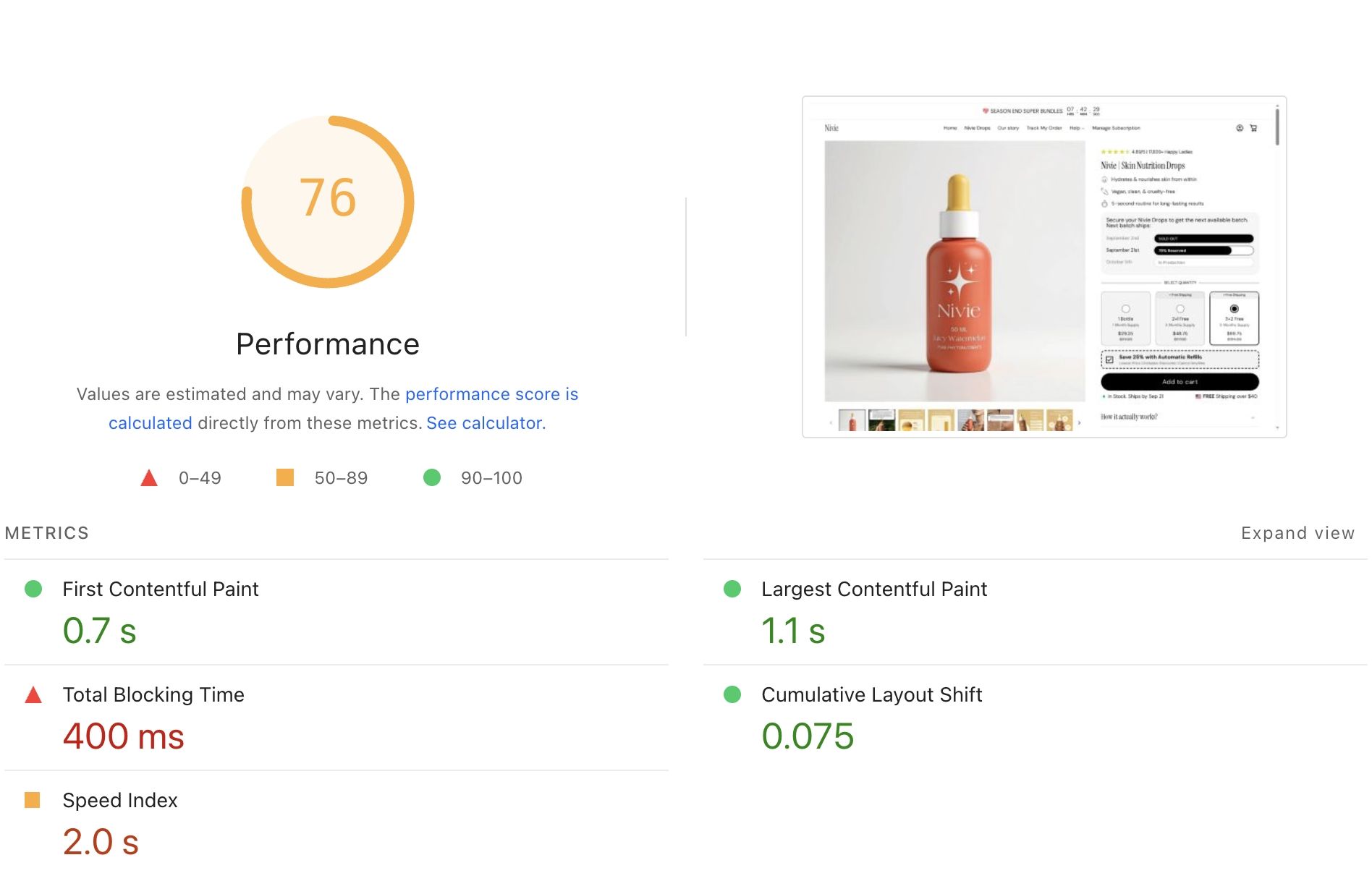
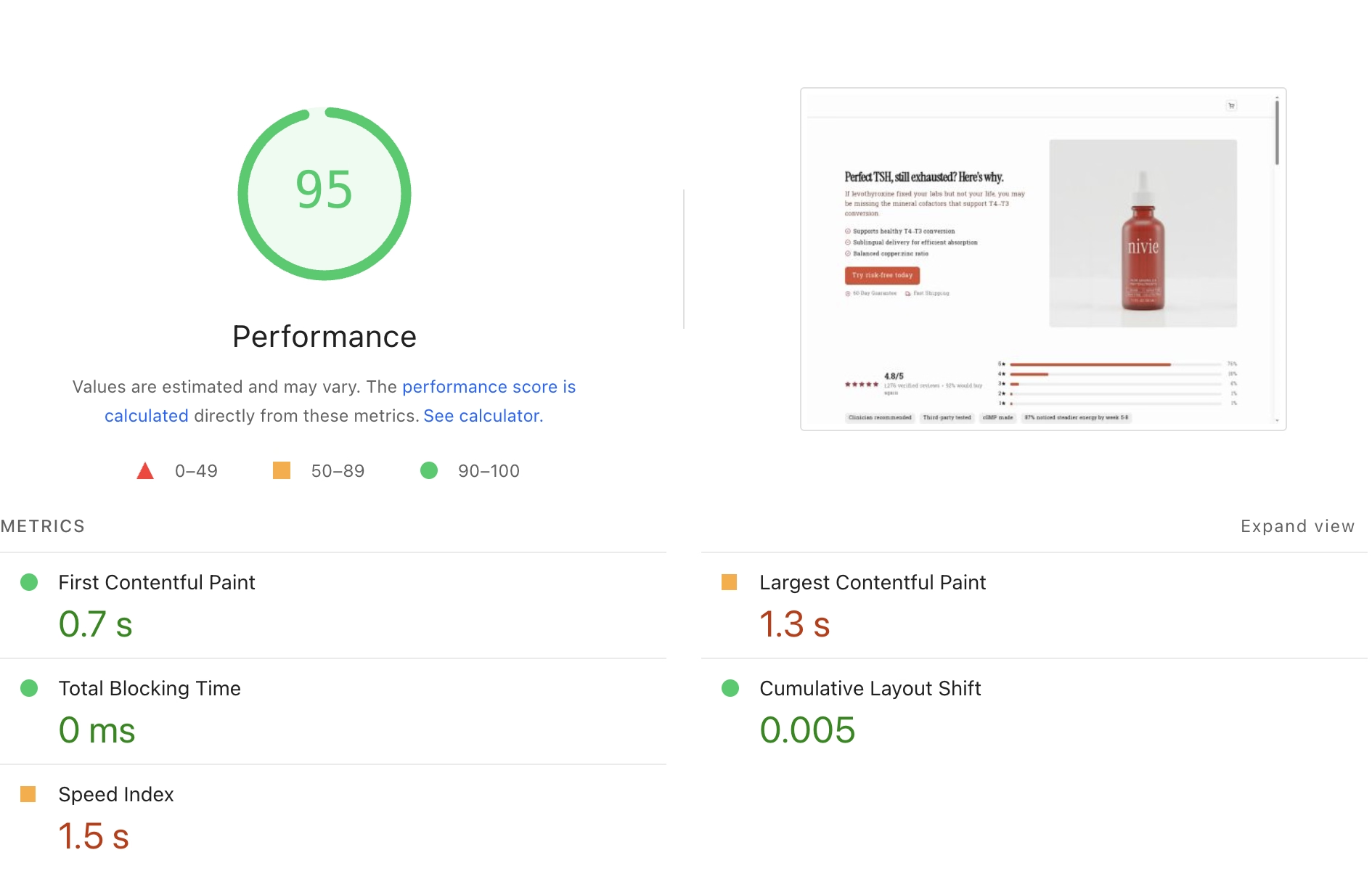
We created mock versions replicating the product pages for top skincare brand Nivie, then ran both the Replo-made page and original page through PageSpeed Insights. We compared the Performance results for all four.
The Replo-built page consistently scored around 20 points higher or more than the original non-Replo built page. The numbers speak for themselves.
How To Improve Your Landing Page Speed
Here’s a checklist of everything you can do to improve your landing page speeds. Target the highest ROI fixes first, then validate with repeatable tests. Remember, page speed optimization should be a routine, not a one-off.
1. Compress And Convert Images To WebP
Oversized images are often the number one drag on performance. They inflate page weight and chew bandwidth, especially on mobile. If you need help to optimize product images, start by enforcing WebP or AVIF output, resizing to display dimensions, and compressing before upload.
Graphics with transparency often fit PNG, but consider WebP there too. Replace heavyweight GIFs with SVG or Lottie where sensible.
Start with the heaviest assets. Convert product and lifestyle images to WebP and use quality settings that survive zoom and retina displays. Keep originals archived in case you need a different crop later.
2. Lazy Load Media Below The Fold
Lazy loading delays non-critical images and embeds until they’re near the viewport. This keeps initial load lean. Make sure to lazy load images and use lightweight video placeholders.
Be very strict on your content above the fold. Only hero imagery, key copy, and a primary call-to-action should load immediately.
3. Defer Or Delay Non-Critical Scripts
Use the defer attribute or timed loading so secondary scripts don’t block rendering. Prioritize assets that make the page usable first. Push the rest after first paint or on interaction.
Common candidates include chat, social widgets, and non-essential analytics.
4. Preload Hero Images And Headline Fonts
Preloading is ideal for the hero image and the primary text font for headlines used above the fold, as it is the first thing viewers see. This will shorten the LCP for your pages.
Replo uses server-side rendering (SSR) to load all pages the first time a user lands on a new page. This means that instead of the page being built on a users' browser, it is being rendered on a separate server and then sent pre-made to the user.
The end result is a page that loads much faster with shorter First Contentful Paint (FCP) and LCP—a key factor when your user is at an important decision point on your pages, such as during add-to-cart or checkout.
5. Pre-fetch Linked Content On Your Pages
Pre-fetching allows your pages to load faster by pre-loading linked content on your pages, before users even click on it in the viewport. By the time users click on a link to that content, it has already been loaded and will then show up faster for users.
You'll need this for when you insert links to product detail pages on collections pages, or PDPs on listicle pages. The smoother the user experience, the better.
6. Use Google Tag Manager For Tracking
In general, adding tracking pixels from any page can delay interactivity, though some pixels can be delayed until user action without hurting measurement. As a result, brands should be careful about using pixels and remove anything unused.
Google Tag Manager (GTM) is a good solution that lets you centralize pixels, load many tags asynchronously, and control when they fire. Think of GTM as a traffic control cop: it ensures you page loads first, before firing pixels using its page view trigger.
GTM also moves scripts from the visitor's browser onto a server (called server-side tagging). That means fewer heavy scripts need to run on the phone or laptop, which usually makes pages feel lighter and faster.
Last but not least, GTM listens for a consent switch. Until a visitor says “yes” to data collection for advertising and analytics purposes, many tags stay quiet or run in a limited, low-impact mode. Less code runs up front, so the page can appear quickly; if consent is given later, then GTM will fire your pixels.
Replo enables users to add pixels or tagsfrom a range of tools for analytics tracking. Plus, we directly integrate with Google Tag Manager to keep your pages running fast. Make sure to migrate scattered scripts into GTM and align triggers with real needs, so your storefront stays light while preserving measurement.
Page Speed Testing Tools And Workflow
Combine lab testing with real-user signals and schedule checks before and after major releases. This keeps regressions from sneaking into your page building workflows.
Google PageSpeed Insights
We've said it before and we'll say it again. Run critical templates through PageSpeed Insights, and make sure to do it for both desktop and mobile devices! Keep an eye on FCP, which determines when users see your content on first load, and heavily impacts user bounce rate.
Get real world user data from the Core Web Vitals Assessment and refer to the Diagnose Performance Issues section to see their lab analysis on potential issues with your page performance.
GTMetrix And WebPageTest
When you want a deeper breakdown, fire up GTmetrix or WebPageTest. You’ll spot blocking assets, request cascades, and oversized payloads in detail. Test from geographies that match your customers.
Continuous Page Speed Monitoring And Testing
Pick thresholds for FCP, LCP, INP, and CLS that align to your targets. As you validate results, analyze and iterate over time so changes hold up across campaigns and seasons. Record each content change made across your landing pages as you A/B test.
Schedule a monthly page speed audit alongside release notes.
- Baseline your current performance and document the metrics.
- Fix the biggest bottleneck on a single key template.
- Verify improvements with your tool of choice.
- Monitor weekly and log changes next to score shifts. Understand that scores will be variable and fluctuate over time, and a deviation by a few points doesn't necessarily mean something has gone wrong.
Sometimes the fastest page isn’t the top product page converter, and vice versa. Create controlled variants for elements to test individually, taking into account our recommended tactics to optimize your pages for conversions.
Run your A/B tests until statistically significant and keep your learnings in a shared doc. Learn more about A/B testing in our full guide.
Improving Your Page Speed With Replo
You might wonder if visual page builders slow sites. We built Replo exactly to avoid this, including these features to keep your stores running fast:
We pre-generate pages on our edge network to ensure optimal speed. For the more technical, we do this with Next.js generated pages on Cloudflare workers, and provide server-side rendering for all page loads and link pre-fetching.
This means lower Time To First Byte (TTFB, the time from a resource request to the first byte of the response being received), shipping less Javascript by default, caching of the full HTML for pre-built pages, fewer third-party scripts dragging down your pages (as often happens with Liquid themes in Shopify), and just smarter data fetching.
All that is to say that a Replo-built page runs faster than any other page out there.
When you’re ready to scale execution across campaigns, use our guide to build product pages with Replo.
Start building faster pages today.
FAQs About Page Speed Optimization
What is page speed optimization?
It’s the practice of making pages load, respond, and stay stable faster using tactics like image compression, smart script timing, caching, and better delivery. Faster UX lifts conversions and lowers bounce—simple as that.
Why does page speed matter for revenue, SEO, and ads?
Quicker pages reduce friction in browse → add-to-cart → checkout, which boosts conversion and makes paid traffic more efficient. Google also uses Core Web Vitals in rankings, and slower sites see higher bounce rates and lower spend.
What Core Web Vitals should I aim for?
Target FCP ≤ 1.8 seconds (avoid going about 3s), LCP ≤ 2.5s (okay up to 4s), INP ≈ 200ms (acceptable ≤ 500ms), and CLS ≤ 0.1 (≤ 0.25 is borderline). These measure loading, responsiveness, and visual stability.
How does Replo help me get faster pages?
Replo serves pre-cached and pre-generated pages on our edge network, with server-side rendering—so you ship less JavaScript and cut TTFB. In head-to-head tests (e.g., Brandefy and Nivie look-alike page builds versus original brand pages), Replo pages scored ~20 points higher in PageSpeed Insights.
Frequently asked questions
- What is page speed optimization?
- It’s the practice of making pages load, respond, and stay stable faster using tactics like image compression, smart script timing, caching, and better delivery. Faster UX lifts conversions and lowers bounce—simple as that.
- Why does page speed matter for revenue, SEO, and ads?
- Quicker pages reduce friction in browse → add-to-cart → checkout, which boosts conversion and makes paid traffic more efficient. Google also uses Core Web Vitals in rankings, and slower sites see higher bounce rates and lower spend.
- What Core Web Vitals should I aim for?
- Target FCP ≤ 1.8 seconds (avoid going about 3s), LCP ≤ 2.5s (okay up to 4s), INP ≈ 200ms (acceptable ≤ 500ms), and CLS ≤ 0.1 (≤ 0.25 is borderline). These measure loading, responsiveness, and visual stability.
- How does Replo help me get faster pages?
- Replo serves pre-cached and pre-generated pages on our edge network, with server-side rendering—so you ship less JavaScript and cut TTFB. In head-to-head tests (e.g., Brandefy and Nivie look-alike page builds versus original brand pages), Replo pages scored ~20 points higher in PageSpeed Insights.